

Hello, future Cloud Architects and DevOps Engineers! Today, we are taking a deep dive into the undisputed king of the cloud: Amazon Web Services (AWS).
But before we look at all the complex acronyms like EC2, S3, or VPC, let's take a step back. How did we get here? To understand the cloud, we must first understand the world of Physical Data Centres.
What is a Data Centre? (The Library of Computers)
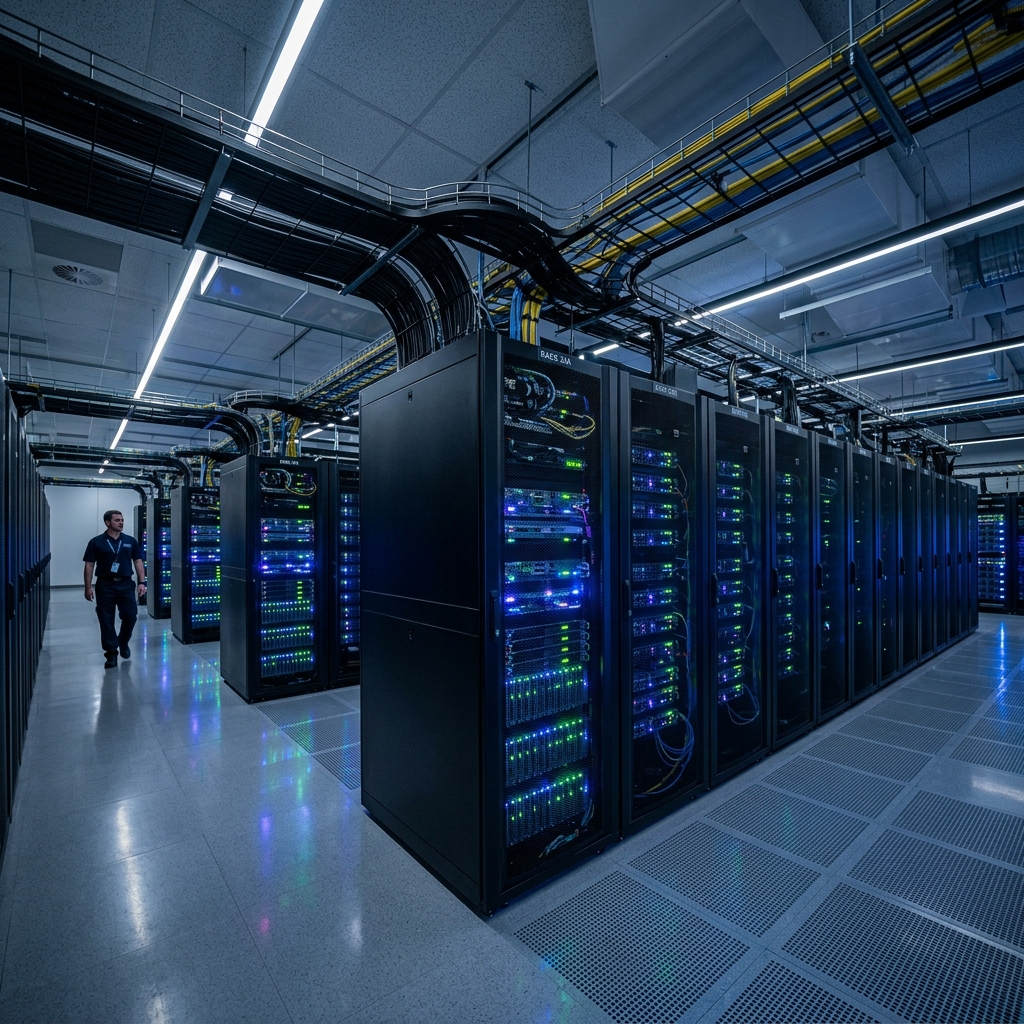
Before the cloud, every website, game, and mobile app on Earth had to live on a real, physical computer. But what if you need to connect thousands of powerful computers together, keep them running 24/7 without ever turning off, and make sure they don't catch fire from overheating?
You need a special, highly protected building designed just for them. That building is a Data Centre.
Let's Think of it Like a Giant Library
Think of a data centre as a giant, high-tech library. But instead of bookshelves filled with paper books, it has rows and rows of tall metal racks stacked with super-fast computers called Servers.
Just like a library needs librarians, lights, and rules to keep books safe, a data centre needs special infrastructure to keep servers running:
- ❄️ Super Cooling (Air Conditioning): Thousands of running computers generate massive heat—like running 1,000 hair dryers in a small room! Data centres have giant, industrial cooling fans and AC units to keep the rooms ice-cold so the computers don't melt.
- 🔋 Uninterrupted Power (Batteries & Generators): If the power cut out for even one second, games like Fortnite or apps like YouTube would crash worldwide. Data centres have rooms full of heavy-duty batteries and giant diesel generators that start automatically if the main power grid goes down.
- ⚡ Super-Speed Internet Cables: They use massive, fiber-optic internet lines connected directly to the backbone of the internet, transmitting data across continents in milliseconds.
- 🔒 High-Level Security: To protect user data, these buildings have barbed-wire fences, 24/7 armed security guards, security cameras, and biometric scanners (fingerprints and eye scans) so nobody can walk in and steal a server.
The Story of Physical Data Centres to Cloud Movement
Imagine it is the year 2000. You want to build a startup—let's say an online bookstore. To get your website running, you had to buy a physical computer called a Server. But you couldn't just keep it in your living room. It generated too much heat, made a loud noise, and needed a continuous power supply.
So, you had to set up or rent space in a Physical Data Centre (often called an On-Premises Data Centre). This meant either building and maintaining your own data centre inside your company's premises or renting space in a colocation facility. In either case, the infrastructure was fully managed by you—requiring your own team to handle everything from assembly to power, cooling, and physical security.
Setting this up was a nightmare for developers:
- 💸 Huge Costs: You had to buy the servers upfront, which cost lakhs of rupees.
- ⏳ Slow Setup: If you ran out of disk space, you had to order a new hard drive, wait weeks for it to be shipped, and drive to the warehouse to physically plug it in.
- 🔋 Maintenance Pain: You had to pay massive electricity bills, manage cooling fans, and hire security guards to keep the machines safe.
Then came the Cloud Movement. Imagine instead of buying a bicycle, building a garage to park it, and repairing it yourself, you could simply open an app on your phone, tap a button, and rent a high-speed bicycle instantly whenever you need it, paying only for the minutes you ride. That is the cloud! You rent Amazon's massive computers over the internet, and they handle the power, guards, and cooling.
How AWS Evolved
In the early 2000s, Amazon was growing rapidly as an online shop. Because they had to handle millions of shoppers, they became experts at building fast, robust internal server systems.
In 2003, Amazon's technology team realized something revolutionary: "We have built a incredibly efficient computer infrastructure. Why don't we let other companies rent our extra servers over the internet?"
In 2006, Amazon officially launched Amazon Web Services (AWS). They started by offering simple storage (S3) and virtual servers (EC2). Startups went crazy for it! Suddenly, a small team of students in a college dorm could rent the exact same computing power as a multi-billion dollar tech giant.
AWS Market Share & Top Clients
Today, AWS is the largest cloud provider on Earth. It holds a dominant market share, powering the backend systems of the world's most popular apps.
~32%
Global Cloud Market Share
200+
Fully Featured Services
240+
Countries & Territories Reached
Top 10 Global Clients Running on AWS
AWS hosts some of the most traffic-heavy applications in the world. Here are the top 10 giants that run their businesses on AWS servers:
Core AWS Services Explained Simply
Let's break down each essential service with a kid-friendly analogy and real-world examples to make learning them clean and easy!
AWS EC2 (Elastic Compute Cloud) 🖥️
What it is: Virtual servers (computers) that you rent inside AWS data centres over the internet.
When you boot an EC2 instance, it doesn't just run in isolation. It relies on a suite of essential components to function. Let's understand each component clearly:
- 💿 AMI (Amazon Machine Image): The pre-built template containing the operating system (e.g., Ubuntu Linux, Amazon Linux, or Windows Server). It serves as the boot source for your virtual server.
- ⚡ Instance Type: Defines the CPU, RAM, and network speed of your server. T-series (like
t2.micro) is small and free-tier eligible, while C-series is optimized for compute, and R-series is optimized for memory. - 💾 EBS (Elastic Block Store): The virtual hard drive. Your files, database records, and applications live here. It persists data, meaning your work isn't lost when you stop the instance.
- 🔒 Security Groups: The instance-level firewall. It defines rules to allow specific traffic (e.g., allow HTTP web traffic on Port 80, or SSH terminal access on Port 22) while blocking hackers.
- 🔑 Key Pairs: A pair of cryptographic keys. You download a private key file (like
key.pem) to log into the virtual terminal securely via SSH without using unsafe passwords. - 🌐 Elastic IP (EIP): A static, permanent public IP address. Normal public IPs change whenever you restart your server, but an Elastic IP stays locked to your instance forever.
- 📜 User Data: A launch script that AWS runs automatically when your server boots up for the first time. You can use it to automate software installations (like Nginx, Docker, or Python).
Configure your virtual server using the options below, then click Launch Instance to observe the booting sequence and test connections!
AWS VPC (Virtual Private Cloud) 🌐
What it is: A logically isolated private network that you provision inside your AWS account, giving you complete control over your network architecture.
Let's break down the essential components that make a VPC work:
- 🌍 VPC CIDR Block: The IP range of your entire network (e.g.,
10.0.0.0/16, which gives you 65,536 private IP addresses to assign to your resources). - 📂 Subnets: Sub-sections of your VPC IP range. You divide your network into:
- 🟢 Public Subnet: Connected directly to the internet. Public-facing web servers, Load Balancers, and NAT Gateways live here.
- 🔵 Private Subnet: Isolated from the outside world. Sensitive databases (like PostgreSQL, MySQL, or MongoDB), internal microservices, background task workers, payment processing engines, and raw log files are placed here for maximum security.
- 🚪 Internet Gateway (IGW): The double-sided gate connecting your public subnet to the public internet. Without an IGW, no external users can visit your website.
- 🛡️ NAT Gateway (Network Address Translation): A one-way security gate. It allows private subnet resources (like databases) to connect outbound to the internet for software updates, but prevents external hackers from initiating connections to them.
- 🌐 Elastic IP (EIP): A permanent static public IP address. The NAT Gateway requires an EIP to remain accessible at a constant address on the internet.
- 🗺️ Route Tables: The router's navigation maps. They contain a set of rules (routes) that determine where network traffic is directed.
- 🛣️ VPC Peering: A direct connection between two VPCs that routes traffic privately. Peering is strictly non-transitive (if VPC A is peered with B, and B with C, A cannot access C).
- 🔒 VPC Endpoints (Gateway & Interface): Direct, private tunnels connecting your VPC to other AWS services (like S3) without using an Internet Gateway or NAT Gateway, keeping data completely inside the AWS network.
Recreate the architecture from the blog diagram below. Click the buttons to trigger different traffic scenarios and trace how data packets travel across the network!
AWS Lambda (Serverless Compute) ⚡
What it is: A serverless compute service that runs your code only when triggered, completely eliminating the need to set up or manage servers.
Unlike EC2, where you pay for the server 24/7 even if it is doing nothing, Lambda charges you only for the exact milliseconds your code runs. Key concepts include:
- 🎯 Triggers: The events that kick off your function (e.g., uploading an image to S3, a API request, or a cron schedule).
- ⚙️ Execution Environment: Lambda automatically creates a micro-container, runs your code, and immediately destroys it.
- 💵 Pay-per-Execution: You get billed based on the number of requests and the execution time in milliseconds.
Select a trigger event to execute your Lambda function. Observe how compute resources scale up instantly, run the function, and scale back down to zero power!
$0.00 / hour when inactive. You pay absolutely nothing when your code is not running!
AWS ALB (Application Load Balancer) 🚦
What it is: A smart traffic controller that automatically distributes incoming user web requests across multiple EC2 backend servers to ensure smooth service and prevent any single server from crashing.
ALB operates at Layer 7 (Application Layer) of the OSI model, which means it can make routing decisions based on HTTP request paths (like routing /api traffic to API servers, and /images to storage servers).
Click Send Web Request to distribute user traffic. Toggle the health state of Server 2 to observe how the load balancer automatically redirects traffic to healthy servers!
AWS Route 53 (Domain Name System) 🗺️
What it is: A highly scalable, global Domain Name System (DNS) service that acts as the internet's phonebook, translating friendly website domains (like growthschool.cc) into numerical IP addresses (like 76.76.21.21) that computers use to talk to each other.
growthschool.cc in their browser, Route 53 intercepts the request, looks up the domain in its record book, and returns the server IP address so the website can load.
Enter a friendly domain name and click Look Up. Observe Route 53 search its registry database and return the machine IP address!
AWS IAM (Identity & Access Management) 🔑
What it is: A centralized security service that allows you to manage who can access your AWS resources and what actions they can perform.
IAM enforces the **Principle of Least Privilege**, which means you should only give users the absolute minimum permissions they need to do their job, and nothing more. Essential IAM concepts include:
- 👤 IAM Users: Individual people (like a developer named Alice) with permanent passwords or login keys.
- 👥 IAM Groups: Collections of users (like a "Developers" group) sharing the same permissions.
- 🎭 IAM Roles: Temporary hats that trusted entities assume. For example, an EC2 instance can assume a role to upload backup files directly to S3 without using hardcoded credentials.
- 📜 IAM Policies: JSON documents that describe exactly what is allowed or denied (e.g., allow S3 reading, but deny billing access).
Developers-Group in IAM. This automatically attaches a policy letting them start EC2 instances for testing, but blocks them from seeing the production billing dashboard.
Select an IAM User Role, then click on different resource rooms to swipe your card. Trace if the gate grants access or blocks it!
AWS Shield (DDoS Protection) 🛡️
What it is: A managed Distributed Denial of Service (DDoS) protection service that secures web applications running on AWS against fake flood traffic.
Click Start DDoS Attack to flood the virtual server. Toggle AWS Shield to see how it automatically deflects malicious requests and keeps latency low!
AWS WAF (Web Application Firewall) 🧱
What it is: A firewall that lets you monitor and filter HTTP/HTTPS requests targeting your web applications based on custom rules (like blocking SQL injection attacks or specific IP ranges).
While AWS Shield handles large volume network attacks (Layer 3/4), WAF inspects request payloads at the Application layer (Layer 7) to block application exploits.
' OR 1=1; --) to break the database. WAF immediately blocks the request and returns a 403 Forbidden page.
Send HTTP requests to the web server. Watch WAF inspect request headers and SQL commands, allowing safe traffic while blocking malicious scripts!
AWS Secrets Manager 🗝️
What it is: A secure vault service that stores, retrieves, and automatically rotates database passwords, API credentials, and secret configuration keys.
Click the button to request the API credential key. Observe how the database password is automatically rotated and served securely to the app!
AWS Certificate Manager (ACM) 📜
What it is: A service that makes it easy to provision, manage, deploy, and automatically renew SSL/TLS security certificates for secure HTTPS website connections.
growthschool.cc, the developer uses ACM to set up an SSL certificate. This enables secure HTTPS, turns the browser address bar icon into a secure padlock, and auto-renews the cert every year.
Click Request SSL Certificate to provision an SSL/TLS cert. Observe the protocol upgrade in the address bar and watch the security padlock snap shut!
AWS S3 (Simple Storage Service) 🪣
What it is: An object storage service that offers industry-leading scalability, data availability, security, and performance, letting you store files of any type and size.
Unlike block storage (like EBS) which behaves like a raw hard drive attached to a single computer, S3 is object storage accessible over HTTP via web links (URLs). Key concepts include:
- 🔑 Objects & Keys: Files in S3 are called "objects", and their paths (filenames) are called "keys" (e.g.,
uploads/avatar.png). - 🪣 Buckets: The top-level folders that hold your objects. Bucket names must be globally unique across all AWS accounts.
- ❄️ Storage Classes: S3 Standard (frequent access), S3 Standard-IA (infrequent access), and S3 Glacier (long-term archive) allow you to save money by moving cold files to cheaper storage tiers.
Select a file type to upload. Watch the bucket dynamically grow to hold the objects and show how key-value storage maps files!
AWS RDS (Relational Database Service) 🗄️
What it is: A managed relational database service that allows you to set up, operate, and scale databases (like MySQL, PostgreSQL, Oracle, and SQL Server) in the cloud without worrying about hardware or operating system configurations.
One of the most powerful features of RDS is **Multi-AZ (Availability Zone) Deployment**. This runs a primary database in one data center and automatically replicates data to a secondary standby database in another data center for automatic recovery during outages.
Click Simulate AZ Outage to trigger a disaster. Watch the primary DB server go offline and see RDS automatically promote the Standby database to Primary!
- Primary DB handles all Read/Write requests.
- Data is copied synchronously to the Standby.
- Web application connects via a single DNS endpoint.
AWS ECR (Elastic Container Registry) 📦
What it is: A fully managed Docker container registry that makes it easy for developers to store, manage, share, and deploy Docker container images.
ECR integrates directly with other container services like EKS and ECS, allowing you to pull images securely using IAM roles without having to manage username and password registry login keys.
Click Build & Push Image to package your application code into a standardized container and push it onto the ECR registry shelf!
12345678.dkr.ecr.us-east-1.amazonaws.com/my-app:latest
AWS EKS (Elastic Kubernetes Service) 🎡
What it is: A managed Kubernetes service that makes it easy to run, scale, and orchestrate containerized applications on AWS without having to install and maintain your own Kubernetes control plane.
EKS integrates with AWS Auto Scaling and Elastic Load Balancers, allowing you to scale container replicas (pods) up and down automatically based on user traffic.
Adjust the traffic slider to simulate user load. Observe how the EKS Horizontal Pod Autoscaler dynamically scales the number of running container replicas!
kubectl get pods -n production
AWS CloudWatch (Monitoring & Logging) 📊
What it is: A monitoring and observability service that collects log files, metrics, and event graphs, providing you with real-time health data for all your AWS resources.
CloudWatch can take automatic actions. For example, if a metric breaches a threshold, it can trigger an Auto Scaling policy to add more servers or shut down idle ones to save money.
Drag the slider to adjust the virtual server's CPU load. Observe how raising the CPU past the 85% threshold changes the monitor graph state and triggers an auto-scaling alarm!
AWS SNS (Simple Notification Service) 📣
What it is: A fully managed pub/sub (publish/subscribe) messaging service that allows you to send instant notifications, texts, emails, and webhook updates to multiple subscribers at once.
Click Publish Broadcast Message to send an alert into the SNS topic. Watch SNS duplicate the message and push it simultaneously to all three subscribers!
AWS SQS (Simple Queue Service) 📥
What it is: A fully managed message queuing service that enables you to decouple and scale microservices, distributed systems, and serverless applications.
SQS acts as a temporary holding buffer for messages, ensuring that if a backend server slows down or crashes, no user orders are ever lost—they simply wait in the queue until the backend recovers.
Click Add Order to push transaction events into the SQS conveyor belt. Click Process Order to pull them out one-by-one!
Fun Practice Project for Students
You can create a free AWS Free Tier account, which gives you 12 months of free access to services like EC2, S3, and RDS database. Create an EC2 virtual machine, install a simple HTML page on it, and launch your first live website to the public internet!
Next Steps on Your DevOps Journey
Now that you understand how servers migrated to the cloud and how AWS services cooperate, you have laid the groundwork for DevOps automation. Next, we will cover how files, processes, and basic administration work inside the operating system of the cloud: Linux!